Most business owners set up their WordPress blog, start writing posts, and treat categories as an afterthought. Something to deal with later. But your blog categories are actually an important strategic decision for your website. They should reflect the core topics your business wants to be known for. Those core topics are your content pillars.
What Are Content Pillars?
Content pillars are the 3 to 5 primary topics that define your expertise and directly connect to what your ideal customer is searching for. They’re the meeting point of what you know best and what your customers need most.
A plumber might build pillars around drain issues, water heater installation and repair, and bathroom remodeling work. An insurance agent might organize around auto coverage, homeowners insurance, and life insurance. Every piece of content you create, whether they are blog posts, videos, or social media, should map back to one of those pillars.
When your blog categories match your content pillars, Google starts to recognize your site as a credible, focused source on those topics rather than a scattered collection of random posts. This matters even more now that AI-powered search evaluates your entire site for topics and consistency, not just individual pages.
Why One Category Per Post Is the Rule
Many business owners assign multiple categories to a single post, thinking more is better. It isn’t. One category per post keeps your site architecture clean and sends a clear signal to search engines about what a post is definitively about. When a post lives in two or three categories, you dilute that signal and can unintentionally create duplicate or competing content on your own site.
Pick the one category that best represents the primary topic of the post, and let that be its home.
A Quick Note on Tags
WordPress also gives you tags, which are a more granular way to organize content within your pillars. Tags can work well for cross-topic connections. For example, a post about water heater maintenance and a post about energy efficiency tips might both get tagged “cost savings” even though they live in different categories. That said, tags really start to come into play when you have a significant amount of content. If you’re just getting started, focus on getting your categories right first.
The How-To: Assigning Categories in WordPress
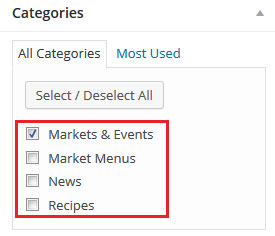
While you’re editing your post, look for the Categories box on the right-hand side of your screen. Click on a category to assign it to your post. You can also add a new category directly from that same box. Your readers will see the category displayed on the post page and can click it to browse all posts in that category which can keep them on your site longer.
Before you write your next post, take a few minutes to define or refine your 3 to 5 content pillars and use those as your categories. That way, everything you publish from that point forward has a strategic home.
Updated February 23, 2026